

Remote Desktop
That Feels Local

Jump Desktop is a secure, reliable remote desktop platform that enables you to seamlessly connect to any computer, anywhere in the world.

Remote Desktop Infrastructure

Fast, secure remote access for everyday work, creative workflows, gaming, support, and automation.

Effortless Setup

Set up as many computers as you need in minutes, or deploy with custom installers, then connect from apps or the web.

Access From Anywhere

Reach the full power of your computer from a laptop, tablet, or phone, with a workspace that fits your screen.

Performance That Keeps Up

Hardware acceleration keeps motion smooth, detail sharp, and input responsive for everyday work, editing, and gaming.

Flexible Workspaces

Create virtual displays, save layouts, and return to the same setup for coding, creative projects, or automated work.

Your Tools Come With You

Use supported styluses, USB devices, control surfaces, security keys, and game controllers as if they were connected locally.

Support & Collaboration

Watch, guide, or take control when needed. Ideal for support, training, and working together.

Built for How You Work

Whatever you do at your computer, Jump lets you do it from anywhere.

Remote Work

Work from home, a client site, or the road on your office computer, with all your apps, files, and monitors. Deploy Jump to every machine, decide who can reach which computers, and keep the screen in the office private while people work.

Jump Desktop for Teams

Creative Work

Edit video, photos, and 3D on a powerful workstation from anywhere, with accurate color and responsive strokes. Give the timeline, viewer, and scopes each a screen of their own, draw with pen pressure and tilt, and keep using the color panels, Stream Decks, and tablets on your desk.

Video editing Photo editing CAD and 3D

Coding and Work

Pick up right where you left off on your work computer. Drop in on a coding agent, a long build, or an overnight render, watch without interrupting it, and find everything exactly as you left it next time.

Remote desktop for coding

Gaming

Play your PC and Mac games from anywhere at up to 480 frames per second, with GPU encoding keeping latency low. Plug in your controller and the game sees an Xbox controller, or use touch controls on your phone.

Remote desktop for gaming

Remote Support

Helping one person needs no plan. Ask to share their screen, or have them send you a link, and they choose whether you watch or take control. For computers you manage, connect without anyone there.

Remote support with Jump Desktop

AI Agents

Give your AI agents a full desktop on any computer or virtual machine. They set up computers, diagnose and fix problems, test your apps, and handle repetitive tasks across your machines, while you watch and step in whenever you want.

Remote desktop for AI agents

Enterprise-Grade Tools for Seamless Management

Centralized Control

Manage users, computers, Access Groups, settings, and policies from one dashboard.

Enterprise-Ready Security

Protect access with SSO, SCIM, 2FA enforcement, domain controls, and authentication policies.

Remote Administration

Review connection activity, retrieve diagnostics, and troubleshoot remote systems without being on-site.

Deploy at Scale

Silent installers for your deployment tool or script, Microsoft Intune for Windows, and managed app settings for iPhone and iPad.

Always Available

Keep computers awake with Sleep Override, cap session length, and limit sign-in to the local users and groups you choose.

Display and USB Policies

Set fixed virtual displays for every connection, and allow input devices, game controllers, and security keys separately.

Pro: dashboard, users and computers, up to 5 Access Groups, logs, and the REST API. Enterprise: adds SSO and SCIM, Connect Settings, multiple virtual displays, 10-bit color, and USB devices. Compare plans or see what Teams adds


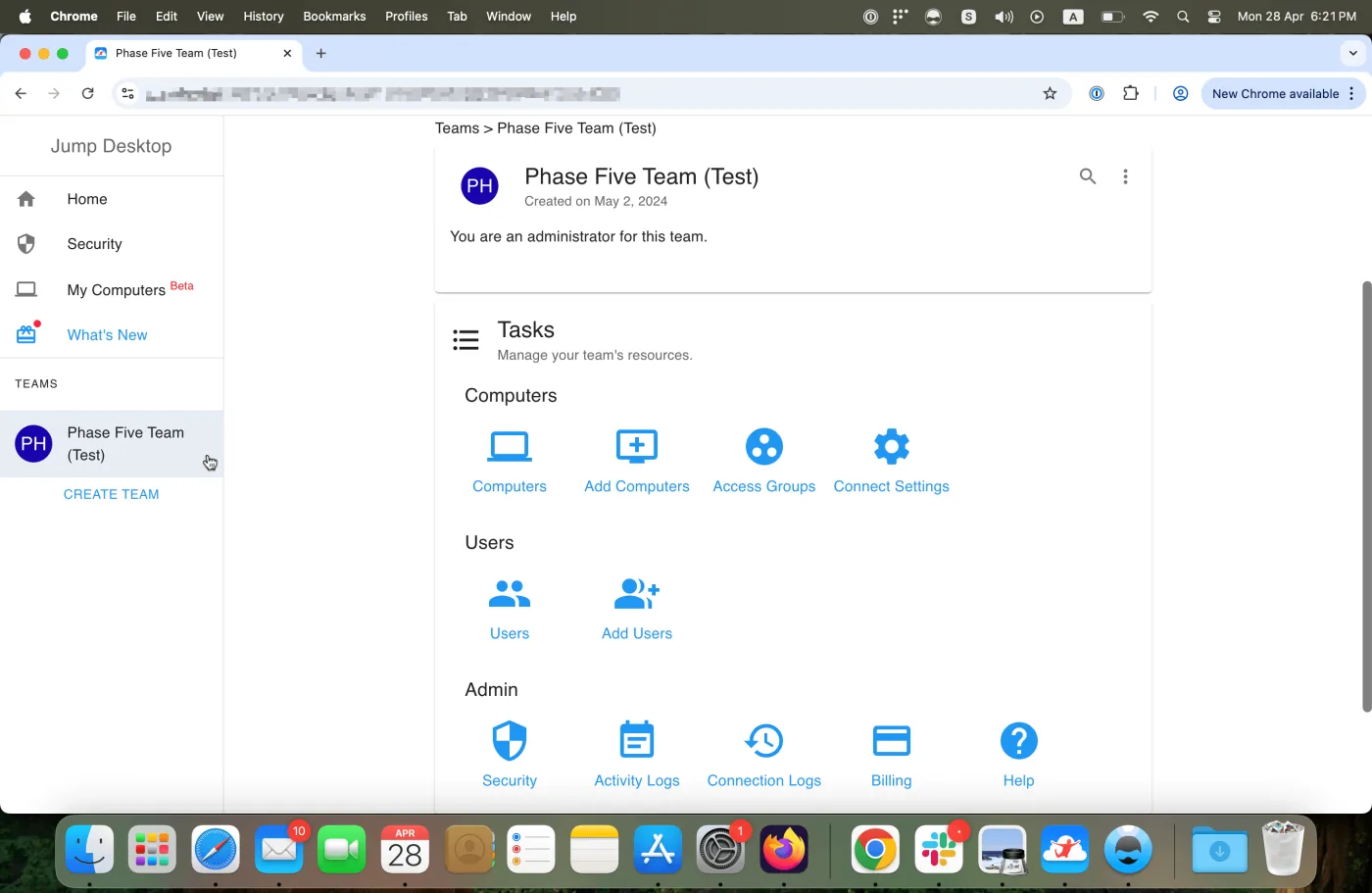
The Jump Desktop for Teams Dashboard, with tasks for computers, users, and admin settings

Jump CLI and AI agents Beta

Let AI Agents Use
Your Computers

Let AI agents see the screen, use the mouse and keyboard, and work in any app on your Windows, Mac, and Linux computers and virtual machines. Watch every move and take over whenever you want.

  • Free with any Jump Desktop account. No Teams subscription needed.
  • Up to 8 computers at once. Set up computers, diagnose and fix problems, test your app on Windows, Mac, and Linux, or hand off repetitive work.
  • Watch in Mission Control. See every session live with a list of each action, then click Take control to step in.
  • Passwords stay out of chat. When an agent needs to sign in, you enter the password in Mission Control and it is never sent to the agent.
  • Automate setup and administration. Set up a computer in one command, and script your team's computers, users, and connection history without writing API calls.
# Works with any Jump Desktop account
$ jump-cli auth viewer login

# Your agent runs the MCP server
$ jump-cli mcp

# Then just ask
> Connect to my Windows build machine and
  test the installer I just built.
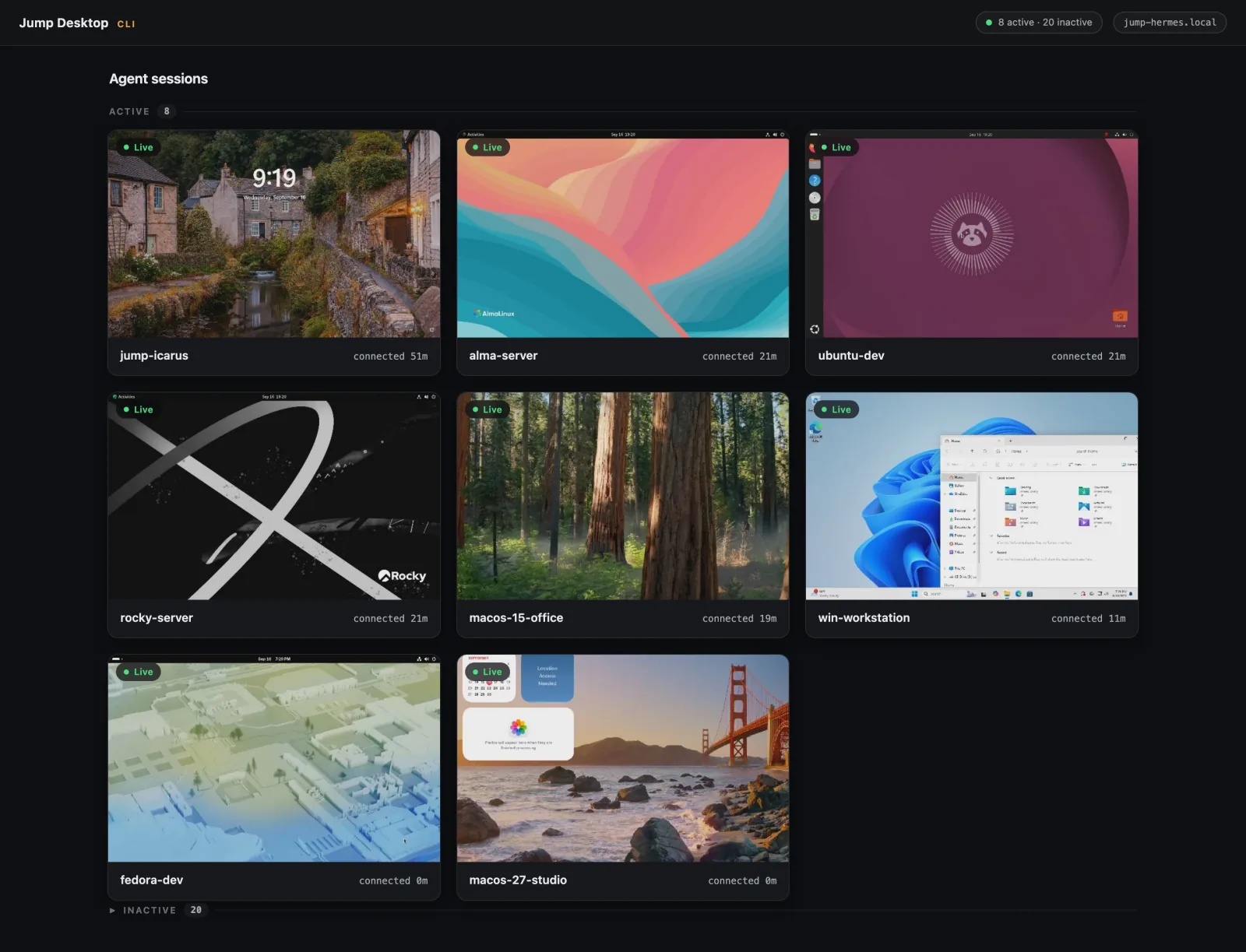
Mission Control showing eight live agent sessions on Windows, macOS, and Linux computers

Get Started with Jump Desktop

Install Jump Desktop Connect on the computer you want to reach and sign in. Then connect from any device below, or a web browser.

Free on Windows, Android, and the web. A one-time purchase on Mac and iPhone or iPad, with a 14-day free trial on Mac. Teams plans add management for organizations.

Security You Can Trust

Every connection is end-to-end encrypted, and encryption can't be turned off. Jump's servers and relays forward the connection but can't decrypt it.

SOC 2 compliance

Jump Desktop meets rigorous SOC 2 standards, ensuring your data is handled with the highest level of security and integrity. Visit the Trust Center

Compliance Made Easy

Activity and connection logs show who changed what and who connected where. Filter them and export as CSV or JSON

Powerful API and CLI Access

Automate setup, connection logs, and team administration with the REST API or Jump CLI, from your scripts or your AI agents

Cloudless Fluid

Deploy independently of the cloud. Connect by hostname or IP address, even on isolated networks with no internet access. Learn about Cloudless Fluid

Connect Settings

Push the same Connect Settings to every computer. Local users can't change settings, grant access to others, or share the screen by link

Lock Down Every Session

Allow only the users and groups you choose to sign in, keep the host screen dark with Privacy Mode, watermark sessions, turn off clipboard sharing, and end idle sessions

Why users love Jump Desktop

I’ve used this app for at least five years and it has honestly performed flawlessly. It connects to our remote server very quickly, no lag time on the keystrokes…

Larry F

I forget where I heard about Jump Desktop, but I'd like to buy the person who recommended it to me a beer...

Craig Whitlock

Ready to transform your business?

Jump Desktop keeps your people and your AI agents productive and connected to the computers they need, from anywhere.